Project Process
The step-by-step guide for managing a project from endorsement and planning through implementation, completion, and turnover.
Use this book to understand what needs to happen next, who needs to be involved, and what should be completed at each stage of a project.
Project Management Process Map
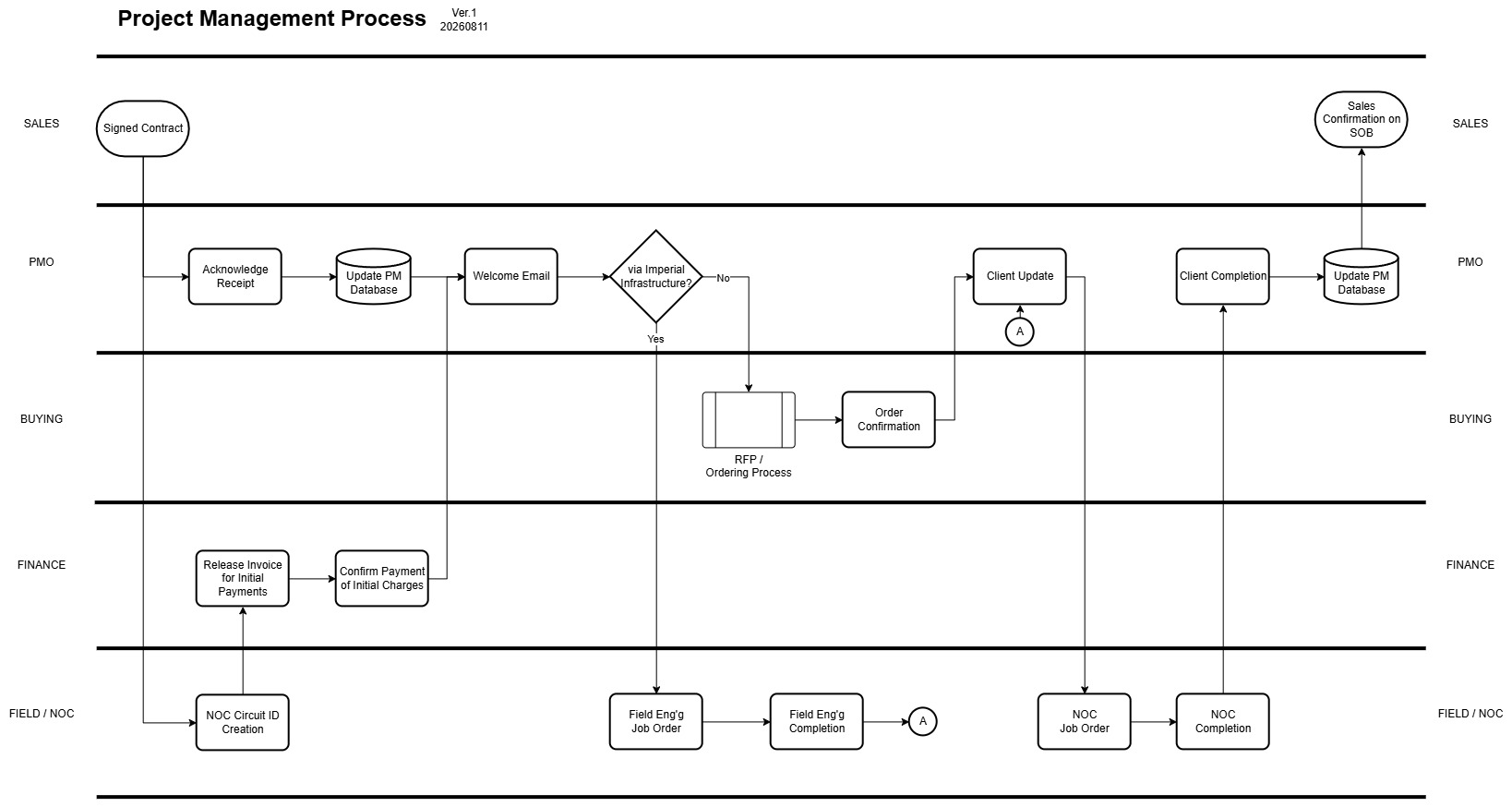
Project Management Process Guide
⏱ Estimated Reading Time: 10 minutes
👤 Intended For: PMO Team
📌 Purpose: Understand the complete project process from Sales endorsement to completion and Start of Billing.
Project Management Process
Purpose
This process explains how a signed customer project moves from Sales endorsement to installation, testing, completion, and Start of Billing (SOB).
The Project Management Office (PMO) is responsible for coordinating the project and making sure it continues moving until completion.
PMO does not perform every activity itself. Other teams such as Finance, Buying, Field Engineering, and NOC have their own responsibilities.
PMO's job is to make sure:
-
The right team knows what they need to do.
-
Activities are followed up.
-
Problems and delays are addressed.
-
The customer is kept informed.
-
The project does not get forgotten or stuck.
-
The project is properly completed and documented.
Simple Rule: If a project is assigned to you, you should always know its current status, what happens next, and who you are waiting for.
Who Is Involved?
| Team | Main Responsibility |
|---|---|
| Sales | Closes the deal, endorses the signed contract, and confirms Start of Billing |
| PMO | Owns the coordination and tracking of the project until completion |
| Finance | Issues invoices and confirms required initial payments |
| Carrier Buying | Orders third-party/local loop services when required |
| Field Engineering | Performs installations using Imperial's own infrastructure |
| NOC | Creates the Circuit ID and performs the required activation/configuration |
| Customer | Coordinates installation requirements and confirms that the delivered service is working |
Before the Project Reaches PMO
Before a contract is signed, Sales should already know how the customer will be connected.
During the sales process, Sales requests a feasibility check.
For sites within Imperial's service area
Infrastructure Design checks whether the location can be served using Imperial's own fiber infrastructure.
For other locations
Carrier Buying checks available local loop options from other telecommunications providers.
Sales uses this information to determine the appropriate solution before proceeding with the contract.
Important: By the time PMO receives the signed contract, the planned method of delivery should already be known.
PMO does not start the project by figuring out whether Imperial or a third-party provider will serve the customer.
The Project Process
1. Sales Endorses the Project
The project officially enters PMO once Sales sends an endorsement email.
The endorsement email must include:
-
The signed contract
-
The necessary project/customer information
-
Finance in copy
PMO must:
-
Acknowledge receipt of the endorsement.
-
Review the signed contract and project details.
-
Check the agreed service and delivery method.
-
Update the PM Database.
-
Start monitoring the project.
Do not leave a Sales endorsement unacknowledged.
If information is missing or unclear, PMO should immediately clarify it with Sales.
2. NOC Creates the Circuit ID
Once the project is received, NOC creates the Circuit ID for the new service.
The Circuit ID becomes the primary reference for identifying the customer's circuit.
PMO should make sure the Circuit ID is properly recorded in the PM Database and other applicable project records.
3. Finance Handles the Initial Payment
Finance releases the invoice for the customer's required initial charges.
Once payment is received, Finance confirms the payment.
Normal Rule
Do not proceed with the Welcome Email and provisioning until Finance confirms the required initial payment.
Special Exception
Some customers may be allowed to pay the initial charges upon installation.
This may be allowed, for example, when:
-
The customer already has an established payment history with Imperial; or
-
Management has specifically vouched for or approved the arrangement.
This is an exception, not the normal process.
PMO should never assume that payment can be deferred. There must be a clear approval for the exception.
4. Send the Welcome Email
Once Finance confirms payment — or an approved payment exception has been given — PMO sends the Welcome Email.
The Welcome Email officially informs the customer that their service will now undergo provisioning.
The email should also introduce PMO as the team coordinating the implementation.
Use the approved:
Templates & Documents → Welcome Email
After sending the Welcome Email, PMO proceeds with the appropriate provisioning path.
5. Follow the Correct Installation Path
At this point, the delivery method should already have been determined during the Sales process.
There are two normal paths.
PATH A — Imperial Infrastructure
Use this path when the customer will be connected using Imperial's own fiber infrastructure.
PMO initiates a Field Engineering Job Order.
Field Engineering then performs the required installation.
PMO must:
-
Create or request the Field Engineering Job Order.
-
Make sure Field Engineering has the necessary customer and project details.
-
Monitor the installation schedule.
-
Coordinate scheduling with the customer when necessary.
-
Follow up until Field Engineering confirms completion.
-
Keep the customer informed.
Once Field Engineering completes its work, the project can proceed to the required NOC activities.
PATH B — Third-Party / Local Loop
Use this path when the service will be delivered using another telecommunications provider's local loop.
PMO initiates the request to Carrier Buying.
Carrier Buying then performs the required RFP / Ordering Process.
PMO must:
-
Send the request to Carrier Buying.
-
Provide the necessary project information.
-
Monitor the order.
-
Follow up on committed dates.
-
Record important updates in the PM Database.
-
Keep the customer informed of relevant progress.
Once Carrier Buying confirms the order and the local loop provider completes the necessary delivery, the project proceeds to NOC.
Does Field Engineering need to visit?
Normally, no.
When using a local loop provider, Imperial generally uses the CPE provided by that provider.
However, Field Engineering may still be required in special cases.
For example:
Imperial decides to install its own router or other end equipment at the customer's location.
In these cases, PMO should coordinate the additional Field Engineering activity.
6. Keep the Customer Updated
Customer updates are a core responsibility of PMO.
There is no single update frequency that applies to every project.
The frequency should depend on the urgency of the project and what is currently happening.
Example: Urgent Installation
If several activities are happening throughout the day, the customer may need multiple updates within the same day.
Don't wait until tomorrow if there is already useful information to communicate today.
Example: Activity Takes One Week
If PMO tells the customer:
"Processing is expected to take approximately one week. We will provide another update by August 20."
PMO does not need to send a daily email simply saying that there is no update.
However, send the update on or before the committed date.
Example: Long Processing Period
Some activities take significantly longer.
For example, an RTA (Request to Attach) with Meralco may take approximately 45–60 days.
Even if there is no major development, PMO should still provide the customer with a weekly update.
The customer should never wonder whether Imperial has forgotten about the project.
If the customer contacts you before your next scheduled update
Respond as soon as possible.
A committed update date is not permission to ignore the customer until that date.
Golden Rule: Never use "We said we'd update them next week" as a reason not to respond to a customer today.
7. NOC Activation
Once the required infrastructure or local loop is ready, PMO initiates the appropriate NOC Job Order.
NOC performs the necessary technical activities required to bring the circuit into service.
This may include:
-
Configuration
-
Activation
-
Testing
-
Troubleshooting
-
Other technical work required for the service
NOC then informs PMO once its work has been completed.
8. Confirm the Circuit Is Working
NOC Completion does not automatically mean Project Completion.
PMO must confirm that the circuit is actually working.
The service should be confirmed working by:
-
Imperial, and
-
The customer
If there is an issue, the project remains active and PMO continues coordinating until the issue is resolved.
Do not close a project just because a Job Order says "Completed."
The actual service must be working.
9. Send the Completion Email
Once both Imperial and the customer confirm that the circuit is working, the Project Manager sends the Completion Email.
This formally documents that the service has been successfully delivered.
Use the approved:
Templates & Documents → Completion Email
Once the Completion Email has been sent, PMO updates the PM Database accordingly.
For PMO purposes, a project is fully completed when the circuit has been confirmed working by Imperial and the customer AND the Completion Email has been sent.
10. Testing Period and Start of Billing
After service completion, the customer is provided the applicable testing period to evaluate the integrity and performance of the line.
The testing period should follow what was agreed in the customer's contract.
Sales provides an additional confirmation.
Even if the testing period is already stated in the contract, Sales communicates the testing period again to the customer and Finance.
This is intentional.
The purpose is to:
-
Avoid misunderstanding of the contract.
-
Make the Start of Billing date clear.
-
Make sure the customer, Sales, PMO, and Finance are aligned.
At the end of the applicable testing period, Start of Billing (SOB) proceeds according to the agreed arrangement.
PMO's Golden Rules
1. Always know the next action.
For every active project, you should be able to answer:
What is happening now?
What happens next?
Who are we waiting for?
When should it happen?
If you cannot answer these questions, check the project.
2. Every next action must have an owner.
Bad:
Waiting for installation.
Better:
Field Engineering to install the customer on August 15.
Best:
Field Engineering to install on August 15. PMO to follow up on August 14 and confirm schedule with customer.
3. Follow up BEFORE something becomes late.
Do not wait until a committed date has already passed before asking for an update.
If something is due Friday, follow up before Friday when appropriate.
PMO should prevent delays, not just document them.
4. Keep the PM Database updated.
Important project information should not exist only in:
-
Email
-
Messenger
-
Group chats
-
Phone calls
-
Someone's memory
If something important changes, update the PM Database.
5. Never leave the customer wondering.
If you have useful information, communicate it.
If there is a delay, communicate it.
If there is no progress because something legitimately takes time, tell the customer when they should expect the next update.
Then make sure you actually provide that update.
6. Acknowledge messages.
If a customer sends a question before your scheduled update, respond.
If another department sends an important project update, acknowledge it.
You may not always have the answer immediately, but the other person should know that their message has been received and is being acted upon.
7. Escalate stuck projects.
Following up repeatedly without getting a result is not project management.
If an activity is already at risk of affecting the committed timeline, escalate it to the appropriate person.
Do not allow a project to quietly sit.
8. "Technical work completed" does not mean "Project completed."
Before closing the project, ask:
-
Is the circuit working?
-
Has Imperial confirmed it?
-
Has the customer confirmed it?
-
Has the Completion Email been sent?
-
Has the PM Database been updated?
If not, the PMO process is not finished.
The Entire Process in One View
Before Contract
Feasibility Check → Delivery Method Selected → Contract Signed
After Contract
Sales Endorsement → PMO Acknowledgement → Circuit ID → Initial Payment → Welcome Email
Then:
Imperial Infrastructure → Field Engineering
OR
Third-Party Local Loop → Carrier Buying
Then:
NOC Activation → Testing → Customer Confirmation → Completion Email → PM Database Update → Testing Period → SOB Confirmation
If You Remember Nothing Else
For every project, PMO does four things:
TRACK → FOLLOW UP → UPDATE → ESCALATE
And before you end your day, you should be able to answer:
"Do I know what happens next for every project assigned to me?"
If the answer is no, check those projects before considering your monitoring complete.